

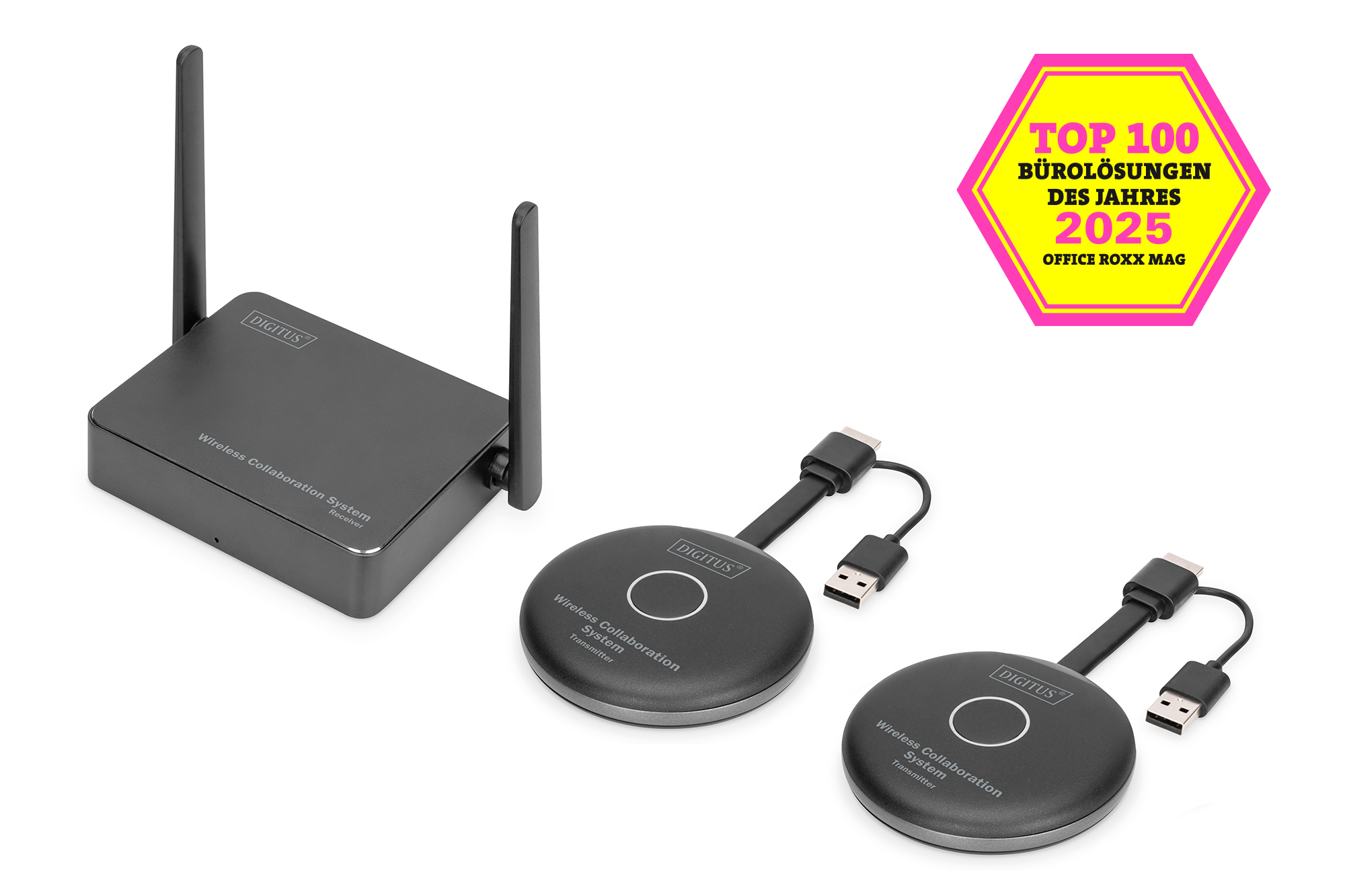
DIGITUS Click & Present Pro - Wireless Collaboration System

Product number: DS-55317
EAN: 4016032478492

Click & Present Pro - BYOD Collaboration System HDMI, 2x TX, 1x RX

Wireless collaboration/presentation system - presenting from a notebook, tablet or smartphone

  • Share, present & collaborate from your notebook, tablet or smartphone - transmission distance of up to 50 m
  • Easy installation - no software or app required
  • Simultaneous presentation of up to 4 participants in split screen
  • Up to 30 participants (simultaneous connection to the recipient)
  • Share from your notebook via HDMI transmitter (transmitter) or via wireless screen (Windows)/screen synchronization (macOS)
  • Share from your tablet/smartphone via the screen synchronization (iOS, iPadOS/Android) of your mobile device
  • Touch Panel Back Control - the touch-back function of the receiver unit enables gestures/controls to be sent wirelessly back to a Windows PC using a finger on a large touchscreen
  • Integrated whiteboard - the main menu of the receiver has a whiteboard function and, in combination with a touchscreen, enables quick notes to be taken during the meeting or presentation directly on the display
  • Supports Windows, macOS, iOS, iPadOS, Android
  • Expandable with additional HDMI transmitters (transmitters) - DS-55322

More product information


Description

The Wireless Collaboration System from DIGITUS® combines all your devices (notebook, tablet, smartphone) and offers a hardware-based presentation solution for wireless transmission of screen content for meeting/conference rooms. Up to 30 participants can be connected to the receiver. Up to 4 participants can present/collaborate simultaneously in split-screen mode. Notebooks can be connected to the HDMI transmitter and the set can be expanded with additional transmitters (DS-55322). Alternatively, you can stream directly from the notebook (without TX) via wireless screen (Windows)/screen synchronization (macOS) to the receiver. Content from a tablet/smartphone can be conveniently shared via the sharing/cast function (iOS, iPadOS/Android) of your mobile device by connecting your mobile device to the receiver (SSID) via WLAN beforehand. The system setup has been simplified as much as possible - no additional software/apps are required. Increase the efficiency of your meetings, save time and achieve optimized results. Share - Present - Collaborate.

Technical details

  • Share, present & collaborate from your notebook, tablet or smartphone
  • Easy installation - no software or app required
  • Transmission distance: up to 50 m (unrestricted view)
  • Simultaneous presentation of up to 4 participants in split-screen mode
  • Up to 30 participants (simultaneous connection to the receiver)
  • Sharing from notebook via HDMI transmitter (transmitter) or via wireless screen (Windows)/screen synchronization (macOS)
  • Sharing from tablet/smartphone via the screen synchronization (iOS, iPadOS/Android) of your mobile device
  • Touch Panel Back Control - the touch back function of the receiver unit enables gestures/controls to be sent back wirelessly to a Windows PC using a finger on a large touchscreen
  • Integrated whiteboard - the main menu of the receiver has a whiteboard function and, in combination with a touchscreen, enables quick notes to be taken during the meeting or presentation directly on the display
  • UHD 4K/60Hz (3840x2160p) on the receiver side - connection of 4K displays
  • Supports Windows, macOS, iOS, iPadOS, Android
  • Supports HDR (High Dynamic Range)
  • BYOD system - Bring Your Own Device
  • Set consisting of 2x TX (transmitter) and 1x RX (receiver)
  • Expandable with additional HDMI transmitters (transmitters) - DS-55322
  • Transmitter connections (transmitter):
  • 1x HDMI, plug (Full HD, 1080p) - connection to notebook, video output, cable length: 5 cm
  • 1x USB-A, plug - connection on notebook, power supply, cable length: 12 cm
  • 1x connection button - Easy sharing
  • 1x LED status display
  • Receiver connections:
  • 1x HDMI, socket (UHD, 4K2K/60Hz) - connection to the output device
  • 1x RJ45, socket (Fast Ethernet, 10/100 Mbps) - connection to the network / Internet
  • 2x USB-A, socket (USB 2.0) - connection of mouse & keyboard / touch display connection
  • 1x USB-C, socket - power supply (10W, 5V/2A)
  • 1x LED status display
  • 2x radio antenna
  • Radio standard: IEEE 802.11 b/g/n/ac, 2.4G/5GHz, 2T2R
  • AES 128-bit encryption
  • WPA2/WPA-PSK/WPA2-PSK authentication
  • Latency: approx. 100 ms (transmitter to receiver transmission)
  • Compression: H.264
  • Housing: Transmitter - ABS / Receiver - Aluminum
  • Dimensions: Transmitter L 8.0 x W 8.0 x H 1.4 cm / Receiver L 8.5 x 10.4 x 2.3 cm
  • Color: grey/black
  • Notes:
  • The transmission distance with limited visibility cannot be determined across the board and depends on the conditions on site
  • Walls, glass, etc. shorten the signal coverage or cause signal loss

Attributes

  • Distance: 50 m
  • KVM: no
  • PoE (Power over Ethernet): no

Package content

  • 1x receiver unit
  • 2x HDMI transmitter
  • 1x USB charging adapter (10W, 5V/2A)
  • 1x storage tray for HDMI transmitter
  • 2x graphics adapter (HDMI - USB-C)
  • 1x USB cable, 1.5 m
  • 1x HDMI cable, 1.5 m
  • 2x USB adapter (USB-A, socket - USB-C, plug)
  • 1x operating instructions

Logistics

  Number (pcs) Weight (kg) Depth (cm) Width (cm) Height (cm) cm³
Packaging Unit Carton 8 12,90 43,00 46,00 31,00 61.318,00
Packaging Unit Inside 1 1,61 19,00 29,00 11,00 6.061,00
Packaging Unit Single 1 1,61 19,00 29,00 11,00 6.061,00
Customs tariff number: 8517620000

Safety notes

  • Observe all warnings and instructions for the appliance.
  • Do not expose the device to rain, moisture, vapors or liquids.
  • Do not insert any objects into the device.
  • Do not attempt to repair the unit or open the housing without authorization. You risk an electric shock!
  • Ensure adequate ventilation to prevent damage due to overheating.
  • Before commissioning, make sure that the device is switched off and is in a safe environment.
  • During thunderstorms, damage can occur to connected electrical devices due to overvoltage caused by lightning.
  • Do not operate the appliance during thunderstorms.
  • Disconnect the appliance from connected electrical devices during thunderstorms.
  • Only use the device indoors.
  • Return the device to your dealer for repair.
  • Dust, moisture, vapors and strong cleaning agents or solvents can cause damage to the device.
  • Disconnect the appliance from the power supply and the connected devices before cleaning.
  • Clean the device with a dust-free cloth.
  • To completely disconnect the system from the power supply, you must unplug the power supply unit from the socket. You can disconnect the device from the power supply via the power supply unit.

EU responsible person

EU based economic operator ensuring the product complies with the required regulations.

ASSMANN Electronic GmbH
Auf dem Schüffel 3
Lüdenscheid
Germany
https://www.assmann.com
info@assmann.com