

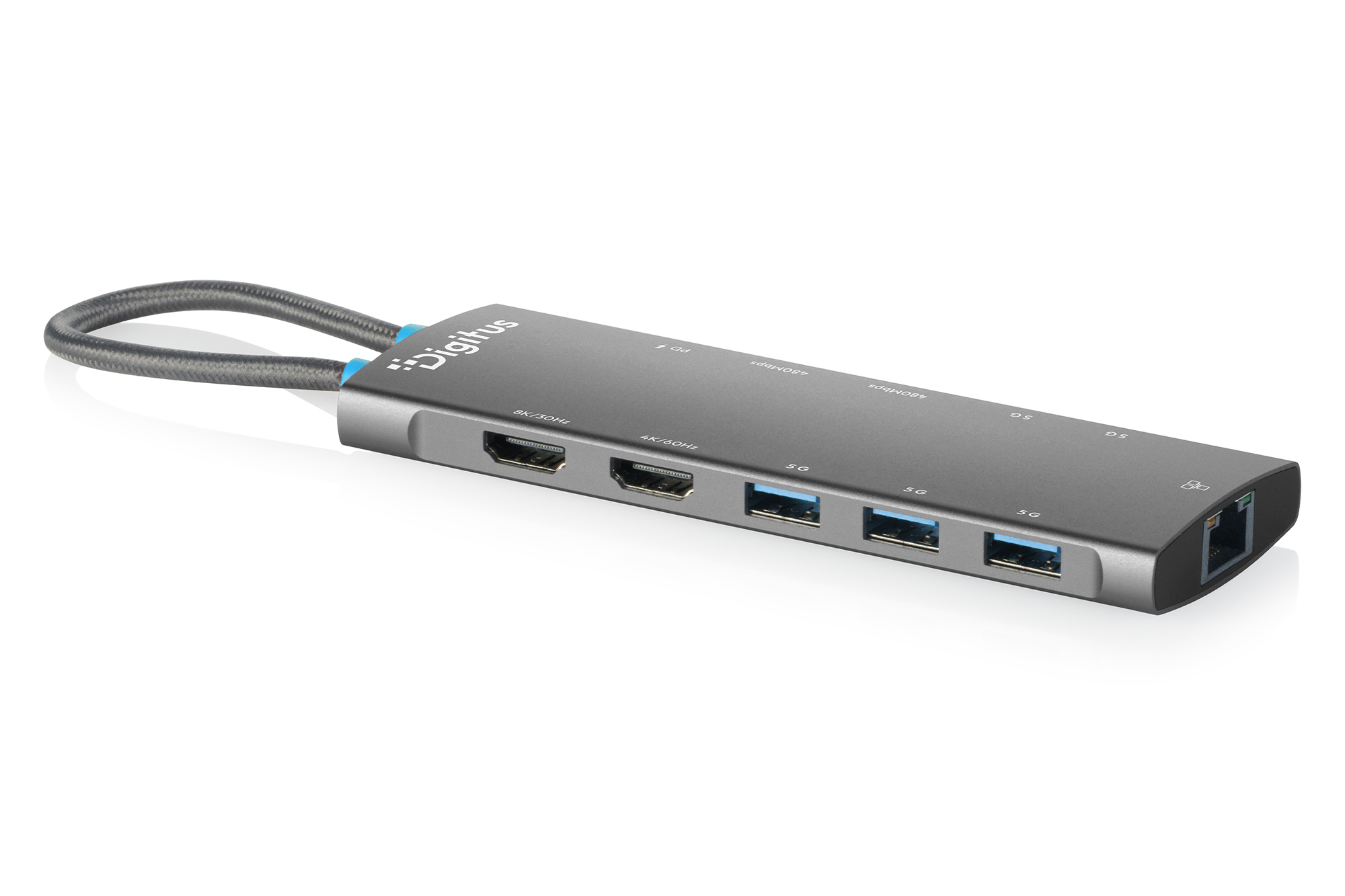
DIGITUS USB-C Docking Station, 11-Port

Product number: DA-70923
EAN: 4016032510154

USB-C Docking Station, 11-Port 2xHDMI,5xUSB 3.2 Gen1, 2x USB 2.0,1x RJ45,1x PD

Top-quality 8K for the most demanding expectations—suitable for any application

  • 2 HDMI ports (1x 8K/30Hz, 1x 4K/60Hz) - Expand your workspace with two additional external monitors
  • 3 USB-A 3.2 Gen 1 ports (5 Gbit/s) for fast data transfer
  • 2 USB-C 3.2 Gen 1 ports (5 Gbit/s) for fast data transfer
  • 2x USB-A 2.0 (480 Mbit/s) for reliable data transfer—ideal for a mouse, keyboard, or other input devices
  • 1x USB-C Power Delivery (3.0) port for charging the laptop and USB devices
  • 1x Gigabit Ethernet port (RJ45) - Connects your laptop to the network via cable. Supports MAC address passthrough
  • Integrated USB-C connection cable (18 cm) - Flexible connection to the host PC
  • Sturdy and reliable aluminum housing
  • Connection cables can be stowed away to save space
  • Supports dual monitors with 2x 4K/60Hz in MST mode (extended display) - Windows, Chrome OS
  • Supports dual monitors with 2x 4K/60Hz in SST mode (screen mirroring) — Windows, macOS, iOS, iPadOS, Android, ChromeOS

More product information

Description

Expand your laptop's capabilities with our high-performance USB-C docking station and create an efficient multi-monitor work environment with brilliant image quality. Using the two HDMI ports, you can connect up to two external monitors and significantly expand your display area. When connecting a single monitor, resolutions up to 8K/30Hz are supported (with DSC—Display Stream Compression). Even when using just one external monitor, extending the display is easy with common operating systems, including macOS. When using two monitors, the docking station supports two displays in MST mode (extended screen), each with up to 4K/60 Hz—depending on the operating system—while in SST mode (screen mirroring), a resolution of up to 4K/60 Hz is possible. Three USB-A 3.2 Gen 1 ports and two USB-C 3.2 Gen 1 ports (5 Gbit/s each) enable fast data transfers. Additionally, two USB-A 2.0 ports (480 Mbit/s) are available for reliable data transfer and charging peripheral devices. The built-in Gigabit Ethernet port (RJ45) ensures a stable network connection, while your laptop is reliably charged via USB-C Power Delivery 3.0. The included USB-C cable (18 cm) offers a flexible connection and can be stored to save space. It supports DisplayPort Alt Mode (DP 1.4, backward compatible with DP 1.2). The rugged aluminum housing rounds out the overall package and ensures durability and high-quality craftsmanship.

Technical details

  • Connections:
  • 1x USB-C (3.2 Gen 2) Input - Host PC Connection
  • 1x HDMI (8K/30 Hz) + 1x HDMI (4K/60 Hz) output
  • 3 USB-A 3.2 Gen 1 ports (5 Gbit/s) for fast data transfer and charging: 4 x 4.5 W (5 V/0.9 A)
  • 2x USB-C 3.2 Gen 1 ports (5 Gbit/s) for fast data transfer and charging: 2x 5W (5V/1A)
  • 2x USB-A 2.0 (480 Mbit/s) for reliable data transfer and charging: 2x 4.5W (5V/0.9A)
  • 1x RJ45 Gigabit Ethernet - 10/100/1000 Mbit/s bandwidth with MAC address passthrough
  • 1x USB-C Power Delivery - 100 watts max. (85W host, 15W dock)
  • Chipset Information: VMM6210 + VL102 + GL3510 + FE8.1 + RTL8153E
  • Supports DP 1.4 Alt Mode; backward compatible with DP 1.2 Alt Mode (DisplayPort Alternate Mode)
  • Supports HDCP 1.4, HDCP 1.3
  • Product Color: Gray
  • Housing: Aluminum/Plastic
  • Weight: 78 g
  • Dimensions: L 14.1 x W 4.6 x H 1.3 cm
  • Operating temperature: 0°C – +45°C
  • Cable length: 18 cm
  • Cable color: Light gray
  • Notes:
  • Extend/Mirror Screen: With common operating systems, including macOS, you can both extend and mirror your screen to an external monitor
  • Supports dual monitors with 2x 4K/60Hz in MST mode (Multi-Stream Transport Mode / Screen Extension)—depending on the operating system
  • Supports dual monitors with 2x 4K/60Hz in SST mode (Single Stream Transport Mode / Screen Mirroring)
  • To use very high resolutions (e.g., 8K), support for Display Stream Compression (DSC) is required. Please make sure that your laptop, the USB-C port (DP Alt Mode), and the connected monitor all support DSC.
  • Not all USB-C ports support all features of the USB-C standard. Make sure your laptop's USB-C port supports DisplayPort Alternate Mode (DP-Alt Mode) and USB Power Delivery (PD).
  • Video output capability (actual resolution) depends on your laptop's graphics card, the connected monitor, and the DP mode.
  • To take full advantage of all features, the laptop must support DP 1.4 Alt Mode
  • It is compatible with the following operating systems up to their current versions: Windows 7 and later, macOS 12 and later, iPhone 15 (iOS) and later, iPadOS 16 and later, Android 14 and later, ChromeOS 116.0.5845.120 and later
  • MST is supported on: Windows, ChromeOS
  • SST is supported on: Windows, macOS, iOS, iPadOS, Android, ChromeOS

Attributes

  • Housing: Aluminum
  • LAN connector (RJ45): yes
  • Resolution max.: 7680 × 4320 Pixel, 30Hz
  • USB-C Power Delivery: 100W
  • Card reader: no
  • Number of display ports: 2
  • Number of network ports: 1
  • Number of USB A ports: 5
  • Number of USB-C ports: 2
  • Number of video ports: 2
  • Video connection ports: HDMI

Package content

  • 1 USB-C Docking Station, 11-Port
  • 1 QIG

Downloads and Certificates

Datasheet

Logistics

  Number (pcs) Weight (kg) Depth (cm) Width (cm) Height (cm) cm³
Packaging Unit Carton 100 15,40 59,00 36,00 24,00 50.976,00
Packaging Unit Inside 1 0,15 19,20 11,00 2,30 485,76
Packaging Unit Single 1 0,15 19,20 11,00 2,30 485,76
Customs tariff number: 8471800000

Safety notes

  • Overloading can lead to overheating and damage to the appliance or the connected peripherals.
  • If necessary, use an external power supply to ensure stable performance.
  • If devices such as external hard disks or printers that require a high power consumption are connected, the device should be used with an external power supply. Otherwise, the device could be overloaded or functional problems could occur.
  • Do not expose the device to rain, moisture, vapors or liquids.
  • Do not insert any objects into the device.
  • Do not attempt to repair the unit or open the housing without authorization. You risk an electric shock!
  • Ensure adequate ventilation to prevent damage due to overheating.
  • Dust, moisture, vapors and strong cleaning agents or solvents can cause damage to the device.
  • Disconnect the appliance from the power supply and the connected devices before cleaning.
  • Clean the device with a dust-free cloth.

EU responsible person

EU based economic operator ensuring the product complies with the required regulations.

ASSMANN Electronic GmbH
Auf dem Schüffel 3
Lüdenscheid
Germany
https://www.assmann.com
info@assmann.com